For recruitment agencies
Recruitment agency software for the whole desk.
One workspace, one pipeline, one place the conversation lives. Exchange is there for the roles that need more than one firm.

If you own the agency
The six questions that decide a system change.
Will the team be more productive?
One record per relationship, one pipeline, one place the email lives, and a Today view that tells each recruiter what is overdue before they decide for themselves. Time not spent copying between systems or reconstructing what happened.
Does it replace enough tools?
ATS, CRM, pipeline, communication history, job pages and advertising, application ingestion, Opportunity Finder and the Deal Desk are one product. It does not replace your accounting system.
Can we migrate safely?
Migration data is used only to deliver your migration, is isolated from every other workspace, is never used to train models across customers, and is deleted from staging with evidence. The full export exists from day one.
Will the team use it?
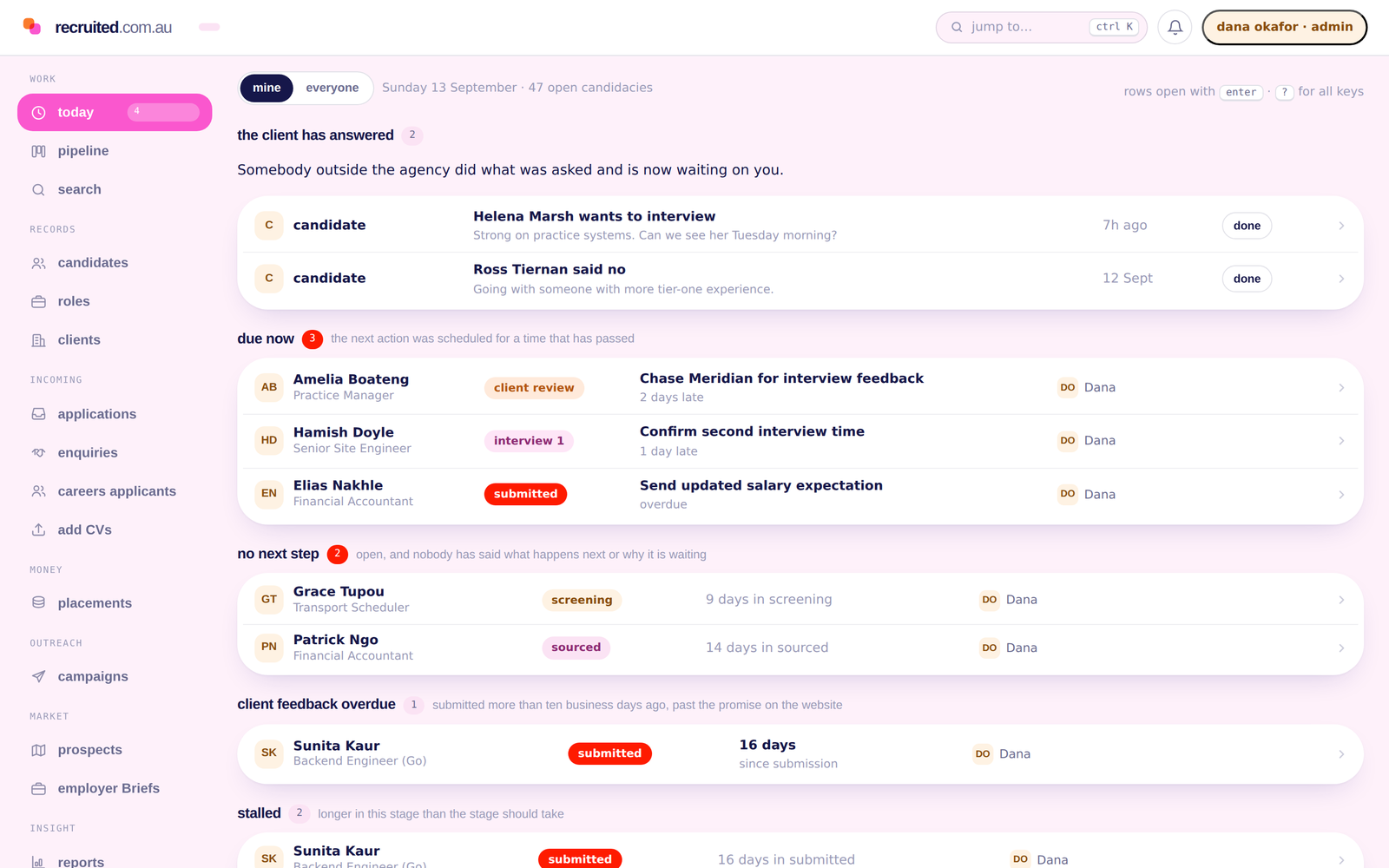
Adoption fails when the tool asks for more than it gives back, so the design bias is towards the screen someone opens at 8am. That is the recruiter lane below.
What does it cost?
A$249 or A$599 a month excluding GST for most agencies, plus users. Managed migration is quoted separately. Enterprise is negotiated.
Is Exchange controlled enough to trust?
It is a publication boundary, not a pool. You publish a specific masked signal for one collaboration under terms you accepted, and nothing identifying a person crosses without that person’s consent. You can run the whole desk without ever touching it.
If you are the recruiter
The screen you open at 8am.
Every system change is sold to an owner and judged by a recruiter.
-
One next action
What is overdue, what is due, whose feedback is late.
-
Movement that means something
Moving a card creates the follow-up rather than adding an admin task.
-
The context is already there
Email, calls and notes on the record, so you are not searching your sent items before a client call.
-
Search that finds people
Filters over structured fields, and a plain-English question when you would rather just ask.
-
Less retyping
Applications arrive as records. Ads come from the opportunity. The placement carries the fee.
-
Nothing rots quietly
A candidacy with no movement and no next action is surfaced.
The data question
LINK is a customer, not a landlord.
Recruited is built by the team behind LINK, and LINK runs its own recruitment desk on it as an ordinary customer. LINK’s workspace has no privileged access to any other workspace. There is no shared candidate pool, no cross-workspace query, and no administrative path that lets one customer read another’s records. Scoping is decided in one module every endpoint uses, a member with no workspace fails closed, and there is a test that proves it.
Getting started
From first conversation to live workspace.
-
A conversation about your desk
How many recruiters, what you are on now, and what is costing you time.
-
A demo on one of your live roles
Rather than a workspace prepared earlier, which tells you nothing about whether it fits.
-
Migration scoped
Including what your current system’s export contains, stated before you commit.
-
Cutover on a date you approve
After a dry run, an exception report and reconciliation totals.
-
Support in Australian business hours
From people who know what a JobAdder export looks like.
For agencies
Bring one live role and see how it fits.
The most useful demo is on a role you are working now.
We reply within one Australian business day.